



Struts Dialogs Mail Reader: Login |  |
Overview
Logon component carries out the following functions:
- Logs a user in
- Logs current user out
- Displays information about logged-in user
Login component is controlled by one action (LoginAction) and has two views: login.jsp and logout.jsp.
login.jsp is shown to a non-logged-in user and allows either to log in using existing user account.
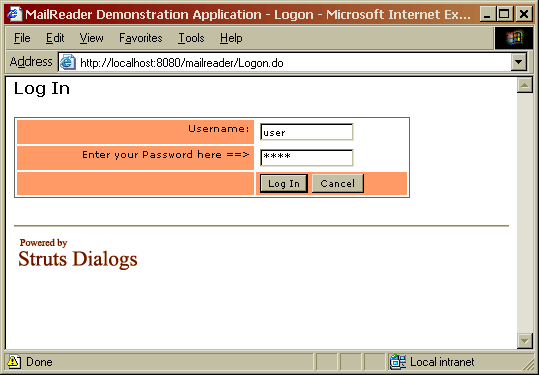
logout.jsp is shown to a logged-in user and allows to check current user's name and to log off the applicaiton.

Login action
MailReader's LoginAction class does not differ much from standard Login Component. The only difference that instead of saving a name of logged-in user in the session, it saves the whole User object, which contains additional account information. Another difference is that LoginAction uses dynabean to store user's name and password, and Commons Validator to check input values.
 public ActionForward onLogon (ActionMapping mapping,
                               ActionForm form,
                               HttpServletRequest request,
                               HttpServletResponse response)
   throws Exception {

   // Validate user credentials, use Commons Validator
   ActionMessages errors = form.validate(mapping, request);

   // Local variables
   UserDatabase database = getUserDatabase(request);
   String username = (String) PropertyUtils.getSimpleProperty(form, "username");
   String password = (String) PropertyUtils.getSimpleProperty(form, "password");

   // Retrieve user from database
   if (errors.isEmpty()) {
     // Load user; if not found, errors will be set
     User user = getUser(database, username, password, errors);
     // If user not found, this effectively logs out current user
     SaveUser(request, user);
   }

   // Errors found; reload dialog and display errors
   if (!errors.isEmpty()) {
     this.saveDialogErrors(request.getSession(), errors);
     return EventForward.DIALOG_RELOAD;

   // Successfully logged in; navigate to home page
   } else {
     return mapping.findForward("success");
   }
 }
Logon pages
Logon component has two pages. login.jsp is shown to a non-logged-in user and allows either to log in using existing user account. logout.jsp is shown to a logged-in user and allows to check current user's name and to log off the application. The following code selects the appropriate page depending on application state:
 public ActionForward getDialogView(ActionMapping mapping,
                                    ActionForm form,
                                    HttpServletRequest request,
                                    HttpServletResponse response)
   throws Exception {
   // Mark response as non-cachable
   setNoCache(response);

   // Display page, corresponding to login state.
   HttpSession session = request.getSession();
   if (session.getAttribute(Constants.USER_KEY) == null) {
     return mapping.findForward("notloggedin");
   } else {
     return mapping.findForward("loggedin");
   }
 }
Next: Subscriptions component
Next: the Subscriptions component.


